Inventory
Inventory is at the heart of NinjaBrew's speed and accuracy.
The Two faces of Inventory
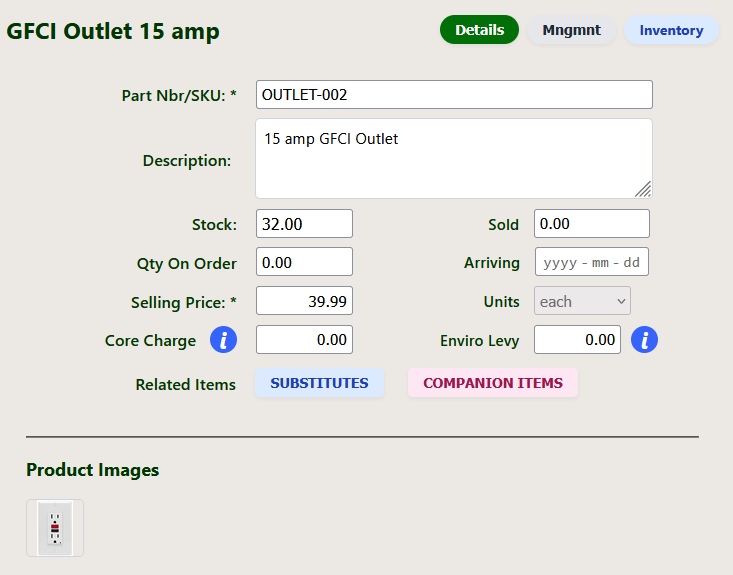
The inventory module presents differently depending on who is using it. On the jobsite or clients see the detail view, which is in fact an abbreviated version. It shows the very basics required to conduct business. The fields are locked and cannot be edited.
- The part number and description are shown
- Up to 4 photos of items can be saved
- Stock levels, on order and additional charges are listed
Inventory Management
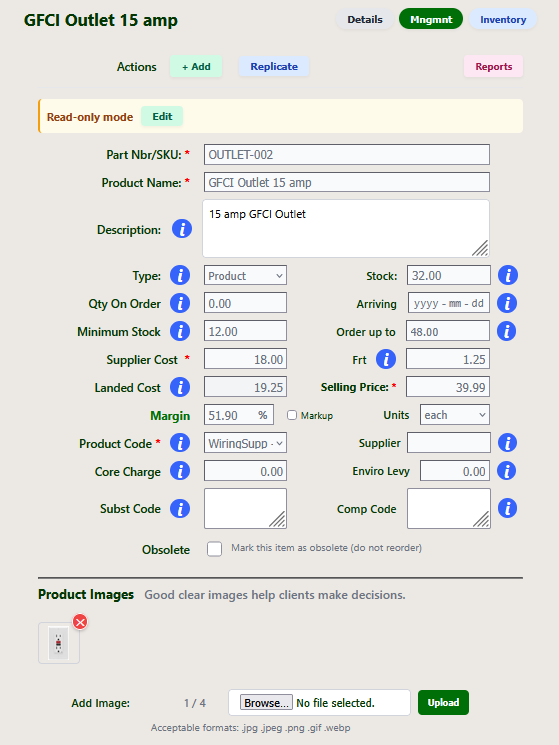
The management module of the inventory section is available to the owner and designated employees. This is where the prices are set, the stock levels and the additional charges are set for things like core charges and environmental levies.
- You can add up to 4 product photos
- You can specify substitute products in case this item is out of stock
- Companion products (upsells) can be entered here as a suggestion to the ordering process
NinjaBrew Pro Version
The Pro version of NinjaBrew allows more users, but more importantly you have the option to giving your clients access to their quotes and the inventory detail modules. This gives them the ability to look at various products as well as play the balance between their desires and their budget.
- Clients can only view their quotes and the basic inventory section
- AI goes one step beyond any companion products you have listed in inventory
- AI only suggests companion products, it doesn't show any sources or prices